
RhinoGuard flagship

My Device
Settings → General → About → tap the part number beside Model Number to reveal the A-number.
Start typing, choose a listed route, or complete all three browse fields. Nothing is assumed.
RhinoGuard flagship

ArmorPro route
RhinoGuard flagship
RhinoGuard route

Privacy glass

TitaniumGuard Ascend
TitaniumGuard Ascend
TitaniumGuard Ascend

Galaxy Watch Ultra metal

47mm protective case

Galaxy Watch 4–6 band collection

TitanForge 22mm
TitanForge 26mm

DuraShield protection

ArmorShield Slide

TitanShield Pro
RhinoGuard flagship
RhinoGuard flagship

RhinoGuard Tactical 360 Pro

RhinoGuard Apex Shield

RhinoGuard Apex Rotation

RhinoGuard Regent

RhinoGuard Vanguard

RhinoGuard Vertex

ChargeStation 7
Live catalog match
Use cases
Turn an iPad into a more capable work, school, or travel setup. This guide explains how the RhinoGuard WorkForce 360° case and RhinoKeys Pro wireless keyboard work together, how to choose the right configuration, and what to verify before ordering.
 Verified product context
An iPad can cover email, forms, notes, presentations, schoolwork and customer-facing tasks—but the right accessories determine whether it feels like a complete workstation or simply a larger phone. An iPad case and keyboard bundle brings two needs into one setup: model-specific protection for the tablet and a physical keyboard for more practical typing.
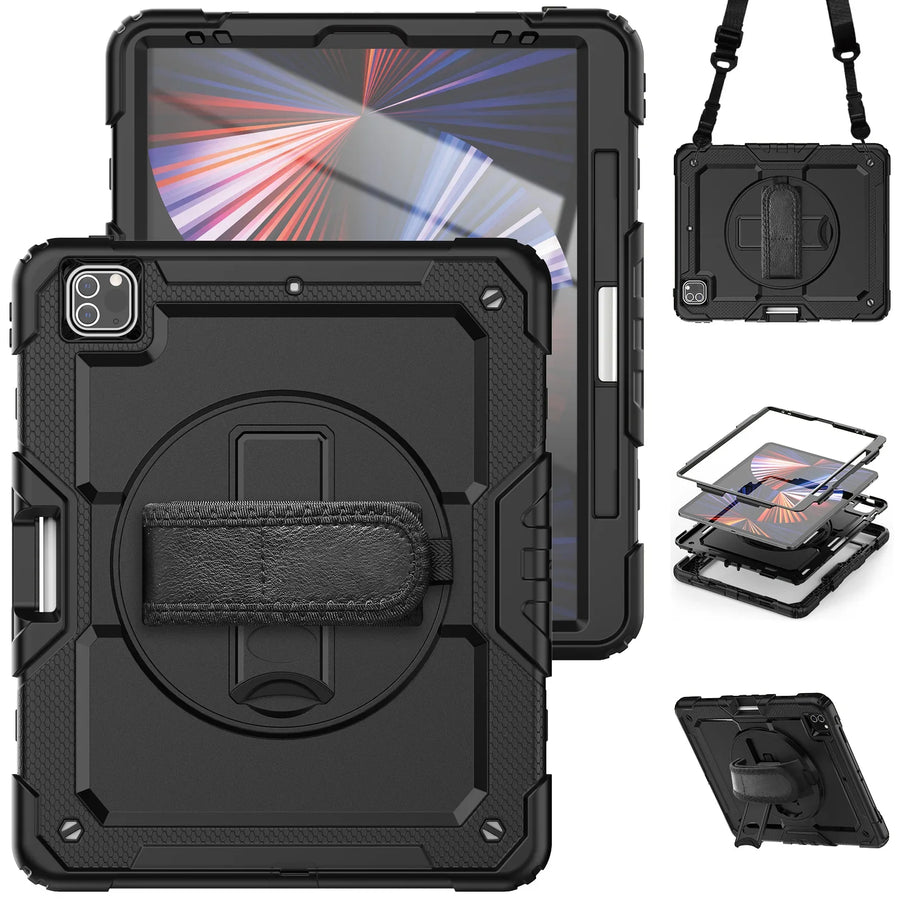
The RhinoGuard WorkForce 360° iPad Case + RhinoKeys Pro Keyboard Bundle is designed around that idea. Its model-specific case combines a reinforced multi-layer shell, 360° rotating hand strap, built-in kickstand, pencil holder and detachable shoulder strap. The separate Black 10-inch RhinoKeys Pro wireless keyboard gives you the freedom to type at a desk, in a meeting room, at school or while traveling. Together, they create a more capable and adaptable mobile workspace.
Short answer: Choose this bundle when you want one iPad setup that can move from secure handheld use to focused physical-keyboard work—without locking the keyboard permanently to the case.
Keyboard cases can be convenient, but they also bind protection, typing position and keyboard size into one fixed design. A separate RhinoGuard case and RhinoKeys Pro keyboard let each part do its own job. You can carry or present the iPad without the keyboard, place the keyboard at a more comfortable distance when seated, and replace or upgrade one component without rebuilding the whole setup.
This separation is especially useful when an iPad changes roles throughout the day. A field technician may need secure handheld access during an inspection and a physical keyboard for the report afterward. A student may read in portrait orientation, then type an assignment at a library table. A small-business owner can present from the tablet and answer longer emails back at the hotel.
| Setup need | WorkForce 360° case role | RhinoKeys Pro role |
|---|---|---|
| Handheld use | Supports more controlled handling through the case’s model-specific design | Stays packed away until typing is needed |
| Desk work | Positions and protects the iPad according to the selected case configuration | Adds dedicated physical keys for email, notes, forms and documents |
| Travel | Helps cover exposed tablet edges during everyday transport and use | Slim, separate format packs with the mobile setup |
| Shared workflows | Keeps the exact iPad model in its own fitted case | Pairs with compatible Bluetooth-enabled devices as needed |

On-screen keyboards are useful for quick replies, but they consume display space and offer little physical separation between the screen and the typing surface. RhinoKeys Pro adds dedicated keys for longer messages, reports, assignments, notes, research and routine administrative work. Because it connects wirelessly to compatible Bluetooth-enabled devices, the keyboard can sit where it works best for the task rather than where a hinge dictates.
The WorkForce bundle includes the Black 10-inch RhinoKeys Pro with an English key layout. It is wireless, rechargeable and non-backlit. The keyboard stays separate from the case so it can be placed at a more comfortable working distance. Avontic sells other RhinoKeys configurations separately, but the compact 7-inch and colorful backlit versions are not the keyboard included in this bundle.
A mobile workstation should remain mobile. The WorkForce 360° case lets the iPad continue serving as a handheld device for inventory, checklists, estimates, presentations, reading and navigation. When a task becomes typing-heavy, set the tablet down, bring out the keyboard and continue. That transition—not a permanently attached keyboard—is the real strength of the system.
The keyboard is a separate accessory, not a fitted keyboard case. The case is selected for the iPad; keyboard compatibility depends on Bluetooth keyboard support. This distinction makes the bundle flexible, but it also means fit and pairing should be verified independently before checkout.

iPad names and screen sizes are not enough to guarantee case fit. Different generations can share familiar names while changing camera placement, buttons, speakers or dimensions. Before ordering, open Settings → General → About and identify the model number beginning with “A.” If Settings initially shows a part number, tap it to reveal the A-number. You can also check the small print on the back of the iPad.
Match that identifier to the exact model option on the bundle page. Never choose only because two devices are both described as 10.9-inch, 11-inch or “iPad Air.” If the exact A-number is not explicitly supported, contact Avontic before ordering. For a deeper walkthrough, visit the Avontic Journal guides and review the iPad model-identification resources.
For an organization deploying multiple iPads, build a model list before placing a large order. A mixed fleet may require several case variants even when the tablets look similar. Avontic can help review model-by-model fit and configuration planning for business, school and team purchases.
The WorkForce bundle is intended to improve everyday protection, handling and productivity. It does not make the iPad indestructible, does not change the tablet’s own water-resistance status, and should not be described using a drop rating or certification unless that claim appears for the exact selected product. The keyboard also does not add desktop software or change iPadOS limitations. Its value is simpler: more practical physical typing in a setup that can still move.
Confirm the exact iPad option, the selected keyboard configuration and the live package contents. Standard U.S. shipping is generally 3–5 business days for orders placed by 6:00 PM Eastern Time; orders placed after the cutoff may require one additional business day, subject to the current shipping policy and destination. Avontic products are backed by 60-Day Returns; review the current return policy for eligibility, available resolutions and conditions.
If the flexible case-plus-keyboard format fits your routine, review the WorkForce 360° bundle’s live options. Still comparing protection styles? Browse the RhinoGuard iPad case collection first, then choose the system that matches how—and where—you actually use your iPad.
Shop this setup
Live Avontic products connected to this guide. Confirm the exact device variant on the product page.
Confirm the exact device and selected variant before purchase. 60-Day Returns.
Continue with Avontic
Device details are verified against official manufacturer references and the live Avontic catalog. Reconfirm the selected product variant before purchasing.